

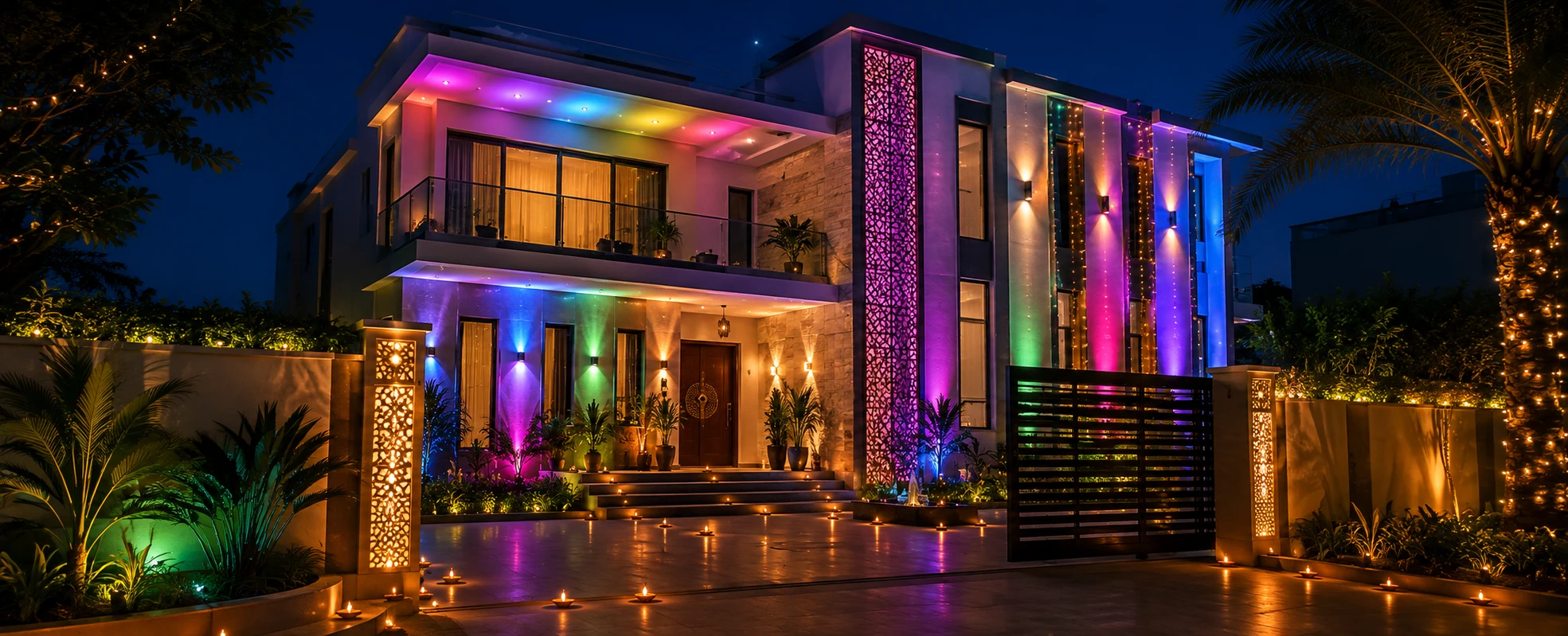
Diwali lighting scenes are pre-programmed lighting settings - such as a warm diya glow, a festive colour wash, or a calm puja mood - that a home automation system like KNX recalls instantly at the tap of a keypad, a voice command, or an automatic sunset trigger, replacing manual switches with one-touch festive ambience. Instead of walking room to room flicking switches, you set the mood of the whole home in a single moment, and let it change itself as the evening unfolds.
Here is how those scenes work, the six worth programming for the festival, and what it takes to set them up properly.
What is a lighting scene in home automation?
A lighting scene is a saved combination of light states - which lights are on, at what brightness, and at what colour - that the system can recall as a single instruction. In a KNX- or DALI-controlled home, a scene is stored on the bus and triggered by a keypad button, an app, a voice assistant, or a time/sunset event. Press once and every light named in that scene moves to its saved level together.
The important shift is from individual lights to moods. You stop thinking "turn on the corner lamp, dim the ceiling, set the strip to amber" and start thinking "Diya Glow" - one label that carries all of those settings at once. That is the whole promise of scene programming, and it is what makes a festival like Diwali, with its constant shifts between welcome, puja, celebration, and wind-down, so well suited to automation.
Why automate your Diwali lighting?
Automation earns its place for four practical reasons:
- One-tap transformation. A single command moves the living room, balcony, entrance, and puja space into a coordinated mood - no switch-hunting mid-celebration.
- Safety over open flames. Diyas and candles are beautiful but genuinely risky around children, curtains, and crowded rooms. Tunable, dimmable LEDs give you the warmth and flicker without the fire hazard.
- It runs itself. A sunset (astronomical) trigger lights the façade at dusk every evening of the festival and switches it off at bedtime, so nothing is forgotten, and nothing burns all night.
- Lower running cost. LED lighting on dimming actuators typically draws far less than older decorative lighting over the long hours of the festival.
What you need: the automation layer
Scene control lives in the wiring, not the bulb. This is where TechVault's work sits - the control layer that makes ordinary fixtures behave intelligently. A typical festive-ready setup uses:
- A KNX bus (or DALI for the lighting sub-system) as the open-standard backbone that lets every circuit talk to every control.
- Dimming and switching actuators that set each circuit's level for a scene.
- Tunable-white or RGBW circuits so a light can shift between a warm 2700K diya tone and a full festive colour.
- Scene keypads (for example, Basalte-style controllers) so a household member can trigger a mood without an app.
- Presence/motion sensors at the entrance, and an astronomical time clock for sunset-based automation.
- Programming in ETS6, where the scenes and their triggers are actually configured.
6 Diwali lighting scenes worth programming
Here are six scenes that map neatly onto how a Diwali evening actually flows. Each is a saved mood you can recall in one tap.
Scene | Mood & purpose | Typical colour/level | How it triggers |
|---|---|---|---|
| Diya Glow | Warm, traditional festival ambience | ~2700K warm amber, low–medium | Sunset (astro) trigger, or keypad |
| Welcome | Bright, inviting entrance for guests | Neutral clean white, high | Presence sensor at the door |
| Puja / Aarti | Calm, reverent, focused | Soft, steady warm, dimmed elsewhere | Keypad, slow fade-up |
| Festival Colour Wash | Showpiece festive colour on accents | Rich saffron/magenta/emerald on strips | Keypad or app |
| Party | Lively, dynamic celebration | Shifting colour, brighter | Voice or keypad, optional music-sync |
| Wind-Down | Gentle close for the night | Low warm glow, then off | Schedule (e.g. auto-off at 11 PM) |
How a scene is programmed, in short: choose the circuits, set each to its target level and colour, save the combination to a scene number on the bus, then bind that scene to a keypad button, a voice phrase, and/or a time trigger in ETS6. Once saved, it is one instruction forever.
How automation triggers bring the scenes to life
A trigger is what recalls a scene without anyone pressing anything. Scenes are useful; triggers are what make the home feel effortless. The ones worth setting up for the festival:
- Sunset / astronomical trigger — façade and balcony move to Diya Glow at dusk automatically, adjusting itself as sunset time shifts across the festival week.
- Time-based sequence — Welcome at 6 PM, Festival Colour Wash at 7:30, Wind-Down at 11.
- Presence at the entrance — porch and doorway brighten as guests approach, then settle back.
- Voice — short, memorable phrases per scene ("festive lights", "puja mode").
- A single goodnight instruction — one command shuts every festive light at once.
If this is your first automated festival, start with just two triggers — a sunset "on" and a bedtime "off." That alone removes most of the daily effort; layer the rest in once you are comfortable.
Traditional diyas vs automated lighting scenes
Automation complements diyas rather than replacing them — but it is worth being clear about the trade-offs.
| Traditional diyas/candles | Automated lighting scenes | |
|---|---|---|
| Ambience | Authentic, irreplaceable warmth | Warm-white tunable to mimic it, plus full colour |
| Safety | Open flame; supervision needed | No flame; child- and curtain-safe |
| Effort across 5 days | Re-lit daily, manually | Programmed once, triggers itself |
| Running cost | Oil/wax, ongoing | Low-draw LED on dimmers |
| Flexibility | Fixed glow | Six moods on one keypad |
Most homes we work with keep a few real diyas for ritual and let automation carry the rest of the house.
How much does smart Diwali lighting cost?
Cost depends on scope, not on the festival. There is no single price, because a "Diwali lighting setup" can mean anything from adding scenes to an existing KNX system to a full lighting-control installation. The factors that move the number:
- Number of lighting circuits brought under control.
- Dimming vs simple switching, and whether circuits are tunable-white / RGBW (colour costs more than warm-white).
- Number of keypads and their placement.
- New-construction vs retrofit (retrofit into finished walls adds labour).
- DALI sub-system for dense lighting, layered under KNX.
What can go wrong and how to avoid it
The most common mistake is over-colouring the whole home. Bold colour belongs on accent and decorative circuits — railings, coves, behind the TV. Keep the functional light in kitchens and dining areas a warm neutral, or the space becomes disorienting rather than festive. Three more to plan around:
- No manual fallback. Keypads should default lights to a sensible state on power blips; keep physical override accessible so a Wi-Fi hiccup never leaves you dark.
- Testing on the day. Programme and test scenes a day or two early — not while guests are at the door.
- Weak network. Voice and app control lean on your Wi-Fi; a dozen extra devices plus everyone's phones can cause lag. The bus itself (KNX) does not depend on Wi-Fi, which is one reason wired control is more reliable for a busy festival evening.
Who is this for?
- Villa & apartment owners who want a festival-ready home without the annual tangle of extension cords.
- Builders & developers specifying automation as a differentiator in premium projects.
- Architects & interior designers who want lighting moods designed in, not bolted on.
FAQs
What is a lighting scene?
A lighting scene is a saved set of light states - which lights are on, how bright, and what colour - recalled as one instruction from a keypad, app, voice command, or time trigger.
Can I add Diwali scenes to an existing KNX home?
Usually yes. If the circuits are already on dimming/RGBW actuators, new scenes are largely an ETS6 programming task rather than new wiring.
Do smart lights work if the internet goes down?
A wired KNX system runs on its own bus and does not need Wi-Fi or the internet to trigger scenes from keypads. Only app and voice control depend on the network.
Are automated lights safer than diyas?
They remove the open-flame risk of diyas and candles, which matters around children and fabrics, while still giving a warm, flame-like glow through tunable-white dimming.
How far ahead should I set this up?
Ideally, programme and test scenes at least a few days before Diwali so everything is confirmed working before guests arrive.