

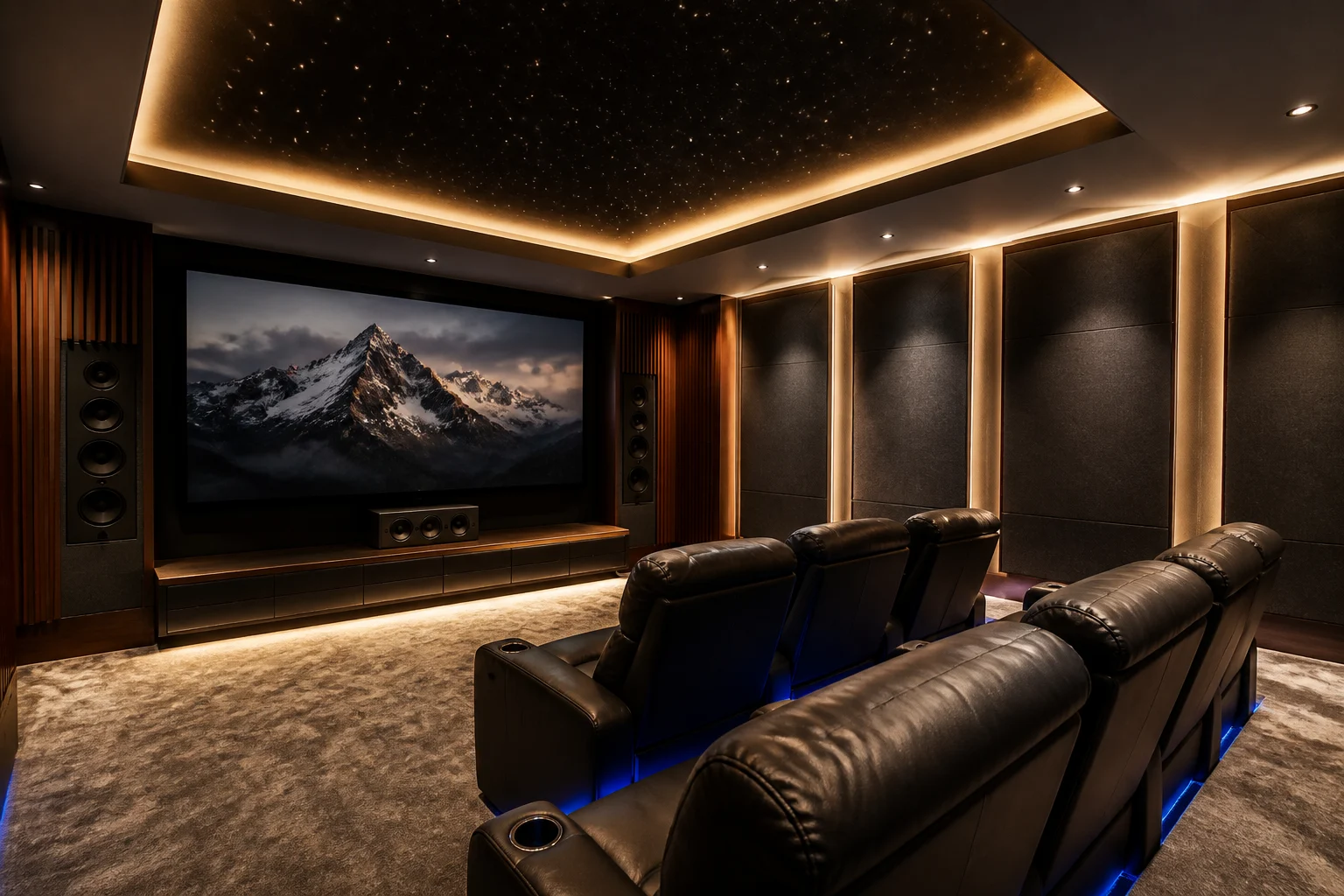
Home theatre lighting isn't decoration — it's part of the picture. The right setup uses bias lighting behind the screen to cut eye strain, dimmable cove lighting for ambience, and low-level step lighting for safety — all tied into a single "Movie" scene that dims the lights, closes the curtains, and cues the projector in one command. Done well, you never touch a switch mid-film; done poorly, expensive AV gear sits in a room that either glares or plunges into total darkness. This guide covers the three lighting layers a theatre needs and how they connect to your AV system.
Why Does Home Theatre Lighting Matter So Much?
A home theatre is the one room where lighting directly affects what you see on screen. Too much ambient light washes out contrast and makes blacks look grey. Total darkness, on the other hand, forces your eyes to strain against a bright screen — the reason your eyes ache after a long film in a pitch-black room.
The goal isn't "dark." It's controlled — the right light, in the right place, at the right level, changing automatically as the film plays. That's where the three lighting layers come in, and why they belong on an automation system rather than a wall of manual switches.
What Is Bias Lighting — and Why Does Every Theatre Need It?
Bias lighting is a soft, low-level light placed behind the screen or TV that reduces eye strain and makes on-screen blacks appear deeper by giving your eyes a reference point.
When you watch a bright screen in a dark room, your eyes constantly readjust between the bright image and the dark surroundings — that's what causes fatigue. A gentle light behind the screen gives your eyes a stable reference, so blacks look richer and viewing feels comfortable for hours.
Two things matter for bias lighting:
- Placement — behind the screen, washing the wall, never spilling onto the screen surface itself or into your eyes
- Colour temperature — a neutral white behind the screen helps preserve colour accuracy; for the wider room, warm white (2700K–3000K) at very low brightness keeps the mood cinematic without cool-white glare, which causes eye fatigue during long viewing
Crucially, bias lighting should be dimmable and on the AV scene — on at 5–10% during playback, off or up between films — not a fixed strip you switch manually.
What Role Does Cove Lighting Play?
Cove lighting is indirect lighting run along the perimeter of the ceiling or a recess, casting a soft glow upward or outward that never causes glare on the screen.
In a theatre, cove lighting is the "ambience" layer — the light that lets people find their seats, pause for a break, or watch a match with the lights up, without ever reflecting off the screen. Because it's indirect and dimmable, it can sit at any level from a barely-there glow to comfortable room brightness.
The rule that matters: every ambient light in a theatre must be dimmable. You should never be forced to choose between 100% brightness and total blackout — the whole point is smooth control between the two.
The Three Lighting Layers a Theatre Needs
| Layer | What It Does | Where It Goes |
|---|---|---|
| Bias lighting | Cuts eye strain, deepens on-screen blacks | Behind the screen/TV, low level |
| Cove / ambient | Sets mood, lets people move safely | Ceiling perimeter, indirect, dimmable |
| Step / task lighting | Safety — stairs, aisles, exits | Low to the ground, directed downward, away from screen |
Each layer sits on its own dimmable circuit. That separation is what makes scene control possible — because a scene can only control what's wired independently.
How Does Scene Control Actually Work?
This is where home theatre lighting stops being lighting and becomes automation — and it's the part a smart home integrator handles, not a lighting-fixture shop.
A "scene" is a single command that sets multiple devices at once. In a KNX-based theatre, one "Movie" command — from a phone, a wall keypad, or triggered automatically when you press Play — can, in a single action:
- Fade the room lights down and switch bias lighting on
- Close the motorised curtains or blinds (essential for a projector)
- Power on the projector/TV and AV receiver, and set the correct input
- Set a sensible starting volume and surround mode
- Optionally set the rest of the home to "do not disturb"
A matching "Lights Up" scene reverses it all when the film ends. Some setups add a "pause" behaviour — cove lighting gently rises when you pause, then dims again on play.
This only works if the lighting is integrated with the AV system, not running on its own separate app. A theatre where the lights, curtains, and projector each need a different remote isn't automated — it's just several gadgets in one room. Tying them together into one KNX-based smart home system is what turns a home theatre into a smart home theatre.
Planning a dedicated theatre or media room in Noida or Delhi NCR? This scene integration is exactly what we design — the lighting, the home theatre AV, and the control all as one system, not separate installs.
Is It Expensive? Is It Worth It? What Can Go Wrong?
Is it expensive?
The lighting hardware itself (LED strips, cove profiles, dimmers) is a modest part of a theatre budget. The value is in the integration — separating circuits and tying them into the AV scene — which is design and wiring work, best planned before the false ceiling goes up.
Is it worth it?
For a dedicated theatre or serious media room, yes — it's often the detail people notice most, because it's the difference between fumbling for a switch mid-film and a room that simply responds. It also protects the experience your expensive AV gear is supposed to deliver.
What can go wrong?
The most common mistake is wiring all the theatre lights onto one or two switches — which makes proper scene control impossible later without rewiring, because a scene can only manage independently-wired circuits. The second is using cool-white lighting (5000K+) in the room, which causes eye fatigue during long viewing. The third is treating lighting as a last-minute addition rather than planning circuits during construction — retrofitting separated circuits into a finished ceiling is far more expensive.
Who Is This For?
- Anyone building a dedicated home theatre who wants the lighting to work as part of the experience, not against it
- Media-room owners wanting one-touch control over lights, curtains, and AV together
- Architects and interior designers planning theatre lighting circuits early enough for full scene control
- Existing theatre owners frustrated with manual switching who want to add scene automation
Lighting is one layer of a complete home theatre project — we cover the audio side in our guide to home theatre speaker placement and the room side in our home theatre acoustics guide.
Planning a theatre and want the lighting done right? Talk to our expert for a design that ties lighting, curtains, and AV into one system.
Building a home theatre in Noida or Delhi NCR? Contact TechVault — we integrate the lighting into your AV scene, so one command sets the whole room.
FAQ's
What colour should bias lighting be?
A neutral white behind the screen helps preserve colour accuracy. For the wider room, warm white (2700K–3000K) at low brightness keeps the space comfortable. Cool white (5000K+) is best avoided in a theatre — it causes eye fatigue over long viewing.Does bias lighting really reduce eye strain?
Yes. Watching a bright screen in a fully dark room forces your eyes to constantly readjust, which causes fatigue. A soft light behind the screen gives your eyes a stable reference, easing strain and making blacks look deeper.Can I add scene control to an existing home theatre?
Often yes, but it depends on how the lighting is wired. Scene control needs each lighting layer on its own circuit. If everything is on one switch, some rewiring is usually needed — which is why separating circuits during construction matters.What's the difference between cove lighting and bias lighting?
Bias lighting sits behind the screen to reduce eye strain. Cove lighting runs along the ceiling perimeter as indirect ambient light for the room. They do different jobs and both belong on dimmers.