

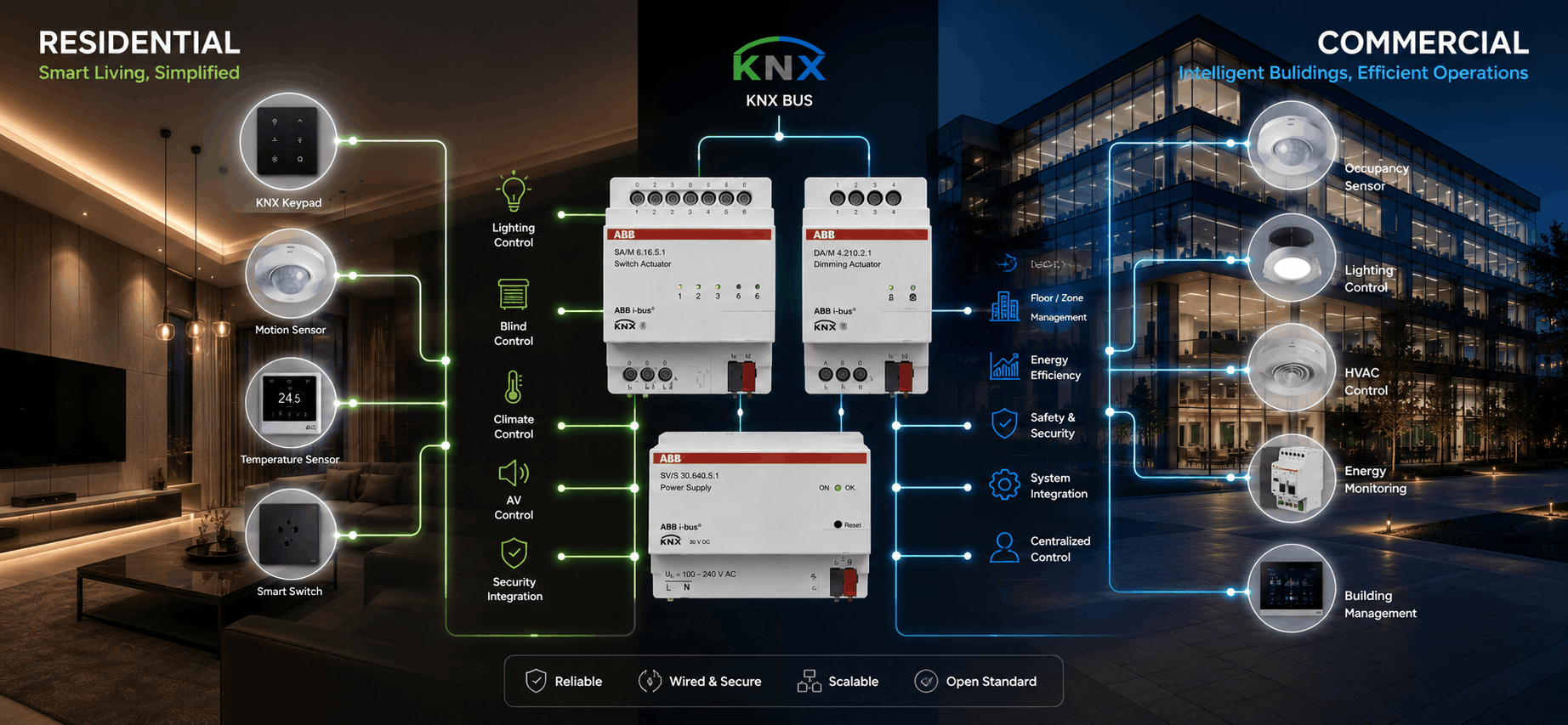
KNX works by connecting sensors, controllers, and actuators
over a dedicated wired bus cable — when a sensor detects an event (a switch
press, a motion trigger, a schedule), it sends a small data telegram
across the bus, and any actuator programmed to respond to that telegram
executes the action, whether that's switching a light, opening a blind, or
adjusting a valve. The same underlying mechanism runs a single living room and
a 20-floor commercial building; what changes is scale, not the technology itself.
At Techvault, we design and program KNX systems for residential and commercial projects across Delhi-NCR, Noida, Gurgaon, and
Jaipur. This guide explains exactly how KNX works — the bus, the components,
the programming — and how that mechanism applies differently in a home versus a
commercial building.
What Are the Core Components of Every KNX System?
Every KNX installation, regardless of size, is built from
the same four component types:
Component |
Function |
Examples |
|
Sensors |
Detect an input or condition |
Switches, motion detectors, light sensors, temperature
sensors |
|
Actuators |
Execute the physical action |
Dimming actuators, relay actuators, blind motor
controllers, valve actuators |
|
System devices |
Manage power and communication |
Power supply unit, line couplers, IP gateway |
|
The KNX bus |
Carries data between all devices |
Twisted-pair (TP) cable, running parallel to electrical
wiring |
A sensor never controls an actuator directly — both are
independently connected to the bus, and the connection between them exists only
in the programming. This is what makes KNX fundamentally different from
a standard electrical circuit, where the switch and the light are physically
wired together.
How Does Data Actually Move Across a KNX System?
When a KNX sensor is triggered — say, a wall switch is
pressed — it sends a small packet of data called a telegram onto the
bus. This telegram contains a group address, which identifies what the
telegram relates to (for example, "Living Room Ceiling Lights").
Every actuator on the bus listens for telegrams. Any
actuator that has been programmed (via ETS6, the official KNX
Engineering Tool Software) to respond to that specific group address executes
the corresponding action. An actuator that isn't programmed to listen for that
address simply ignores the telegram.
This means a single switch press can trigger multiple
actuators at once — the same telegram that turns on the living room lights can
simultaneously trigger a blind motor and an AV scene, if all three are
programmed to the same group address. This is exactly how KNX
"scenes" work — one trigger, multiple coordinated actions.
How Does KNX Work in a Home?
In a residential project, the KNX bus runs through every
room alongside standard electrical wiring, connecting to keypads, sensors, and
actuators at each switch point and device location.
A typical home automation sequence:
- A
homeowner presses "Evening" on an ABB keypad
- The
keypad sends a telegram with the group address for the "Evening"
scene
- Lighting
actuators dim the living room lights to 50%
- A
blind actuator closes the curtains
- A
climate actuator adjusts the AC to the evening temperature setting
- An
AV actuator switches on background music at a preset volume
All of this happens in under two seconds, triggered by a
single keypad press — because every actuator involved was programmed during
commissioning to respond to that one group address.
What this enables in a home:
- Scene-based
control across lighting, climate, curtains, and AV (see our guide on home
automation step-by-step)
- Occupancy
and time-based automation without manual intervention
- Operation
that continues locally even if the home's internet connection goes down,
since the bus doesn't depend on WiFi or cloud servers
How Does KNX Work in a Commercial Building?
The mechanism is identical in a commercial building —
sensors, actuators, and a bus, connected via group addresses and programmed in
ETS6. What changes is the scale and the structure of the network.
KNX topology in larger buildings:
Element |
Residential |
Commercial |
|
Bus structure |
Single line, sometimes two |
Multiple lines connected via line couplers, organised by
floor or zone |
|
Group addresses |
Tens to low hundreds |
Hundreds to thousands, organised in structured naming
conventions |
|
Typical actuator count |
15–60 |
100–1,000+ |
|
Common integrations |
Lighting, climate, curtains, AV, security |
Lighting, HVAC/BMS, access control, occupancy sensing,
energy monitoring |
|
Programming complexity |
Single ETS6 project |
Multiple ETS6 projects merged, often with a central
building management layer |
In a commercial building — an office floor, a hotel, an
auditorium — KNX lines are typically organised by floor or functional zone,
connected through line couplers that allow telegrams to pass between
lines when needed, without flooding every device in the building with every
telegram. This structure is what allows KNX to scale from a single apartment to
a multi-floor commercial property without changing the underlying logic.
A typical commercial KNX sequence:
- An
occupancy sensor in a conference room detects motion at 9:00 AM
- A
telegram triggers lighting actuators to bring lights to 80%, and a climate
actuator to begin cooling the room
- When
the room is unoccupied for 15 minutes, a separate telegram (triggered by
sensor timeout) dims lights to 10% and adjusts climate to a standby
setting
This kind of automation is central to office automation and building automation
projects, where energy savings from occupancy-based control compound
significantly across hundreds of rooms compared to a single home.
What is ETS6 and Why Does Every KNX System Need It?
ETS6 (Engineering Tool Software, version 6) is the official
KNX programming software used to configure group addresses, define which
sensors trigger which actuators, and build scene logic. Every certified KNX
integrator uses ETS6 — it's the universal programming layer regardless of which
certified brand's hardware (Basalte, ABB, CORE, or any of the 500+
KNX-certified manufacturers) is installed.
This is also why the ETS project file matters so much
at handover — it contains the system's complete logic. Whoever holds it
can understand, modify, or expand the installation. We hand over the ETS6
project file as standard practice on every TechVault project, residential or
commercial, so the system remains serviceable by any certified integrator in
the future — not locked to us specifically.
Why Does KNX Work Without Internet?
A question we're asked often: how does a "smart"
system work without WiFi? The answer is in the architecture — the KNX bus is a
dedicated, hardwired communication channel between devices. Sensors, actuators,
and the logic connecting them all live on the bus itself, not in the cloud.
An internet connection is only required for remote access
— checking on the home or building from outside, or voice assistant integration
via a KNX-IP gateway. Core functions — lighting scenes, climate control,
occupancy-based automation — continue operating exactly as programmed, with or
without an internet connection. This is one of the most significant practical
differences between KNX and Wi-Fi-dependent smart home or building systems.
A Real Example
On a 4BHK villa project in Sector 50, Noida, we programmed
14 lighting zones and 6 whole-home scenes — roughly 40 group addresses in
total, managed in a single ETS6 project, on one KNX line.
On a commercial office project, the same underlying
mechanism — sensors, actuators, group addresses, ETS6 — scales to hundreds of
zones across multiple floors, organised into separate lines connected by
couplers, with occupancy sensing driving lighting and climate automation
throughout the building. The programming logic is more complex, and the network
structure is different, but a switch press or sensor trigger in either project
works through the same telegram-and-group-address mechanism described above.
FAQs
Is KNX the same technology for homes and commercial buildings, or different systems?
It's the same underlying technology — the same bus protocol,
the same telegram-and-group-address mechanism, the same ETS6 programming
software. What differs between a home and a commercial building is the scale of
the network (number of devices and zones) and how the bus lines are structured,
not the core mechanism.
Do I need an internet connection for KNX to work?
No, not for core functions. The KNX bus operates
independently of internet connectivity — lighting scenes, climate control, and
other programmed automation continue working locally. Internet is only needed
for remote access (checking in from outside) and voice assistant integration.
What is a KNX group address?
A group address is an identifier that links a sensor's
trigger to the actuators that should respond to it. When a sensor sends a
telegram with a specific group address, only actuators programmed to listen for
that address execute the corresponding action — this is the core mechanism that
allows one switch press to trigger multiple coordinated actions.
Can a KNX system be expanded after installation?
Yes. Because KNX is an open standard with a shared bus, new
devices can be added to an existing line, or new lines added via couplers,
without replacing the existing system. This is one of KNX's key advantages over
proprietary systems — the ETS project file makes future expansion
straightforward for any certified integrator.
How is KNX programming different for a large commercial building versus a home?
The fundamental programming approach — defining group
addresses and scene logic in ETS6 — is the same. For commercial buildings, the
project typically involves significantly more group addresses, structured
naming conventions to manage complexity at scale, and a network topology
organised by floor or zone using line couplers, often alongside integration
with a broader building management system (BMS).
Plan Your KNX System With TechVault
Whether it's a single home or a multi-floor commercial building, the underlying mechanism — sensors, actuators, a shared bus, and ETS6 programming — stays the same. What changes is the design and scale of the network, which is where experienced integration matters most. Talk to our team for a free consultation on your residential or commercial KNX project, or explore our home automation and building automation services.