

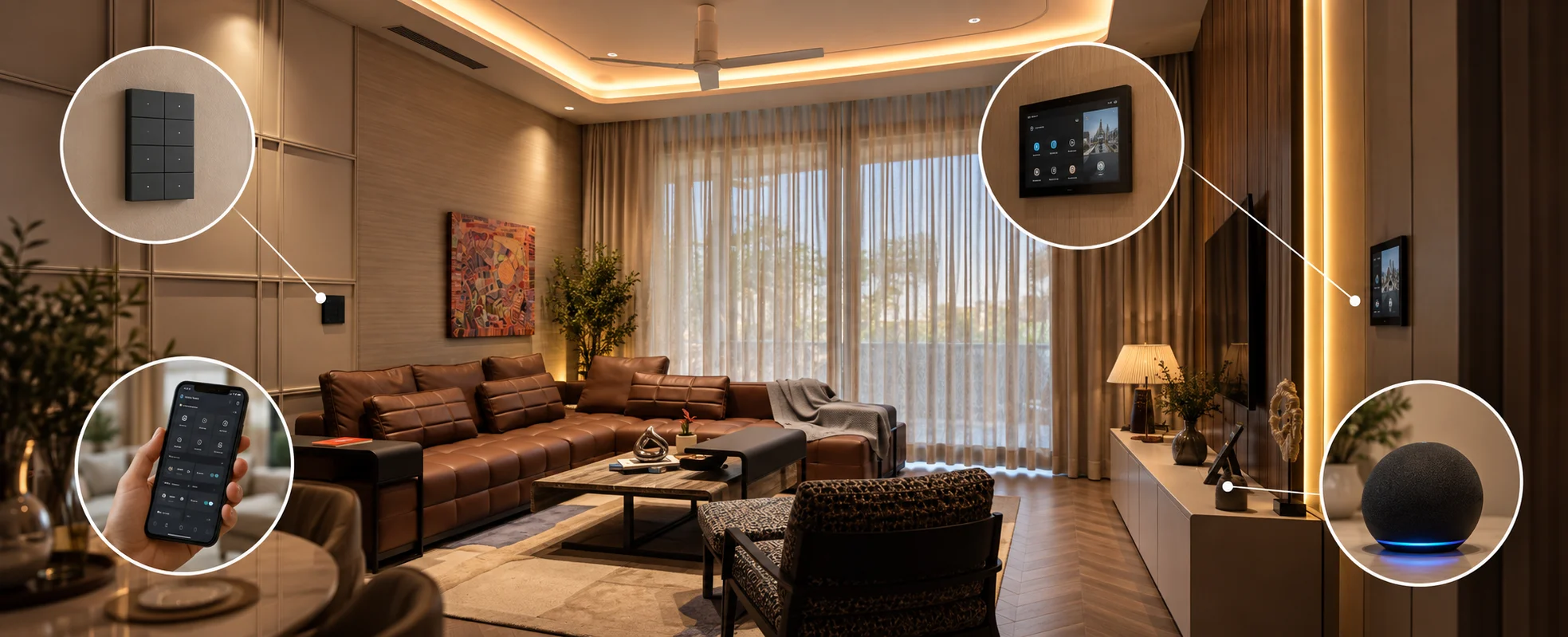
No single control interface is right for a whole home. Use keypads where you act by muscle memory - bedside, every room entrance. Use touch panels where you need visual feedback - main entrance, kitchen, home theatre. Use the app when you are away from home or need full system access. Use voice when your hands are full. The most common mistake is installing touch panels everywhere; a touch panel at a dark bedside is worse than a simple keypad.
Introduction
Most conversations about smart home control focus on brands. Basalte or ABB. CORE. Which keypad looks best, which glass finish suits the interior.
These are real decisions, but they skip a more fundamental one: what kind of control belongs in each room in the first place?
A smart home offers four ways to control it: a touch panel, a physical keypad, a mobile app, and voice. Each is excellent in the right place and frustrating in the wrong one. Yet the default approach on many projects is to pick one and repeat it everywhere, usually a touch panel because it looks impressive in a showroom.
That is the wrong way to think about it. The right interface depends entirely on how a person uses a particular room - whether they are looking at the wall or walking past it, whether their hands are free, whether it is bright or dark, whether they are home or away.
This guide breaks down each interface, where it belongs, and - just as importantly - where it does not.
The Four Interfaces
Before matching interfaces to rooms, it helps to understand what each one actually is and what it does well.
Touch panel. A glass screen, usually wall-mounted, showing a graphical interface. It can display scenes, room status, temperature, camera feeds, music, and more. It offers rich visual feedback - you can see what is on, what temperature a room is, what is playing. It is the most capable interface visually, and the most demanding to use, because it requires you to look at it and interact deliberately.
Keypad. A physical set of buttons - mechanical or capacitive - each mapped to a function or scene. It offers no screen, just tactile buttons in fixed positions. Its strength is exactly that fixedness: the button is always in the same place, so you learn it without looking. Press the top-left button for "all off" a hundred times, and your hand finds it in the dark.
App. Full control from a phone or tablet. It offers the deepest access - every device, every setting, every automation - and it works from anywhere. Its weakness is friction: unlock phone, open app, wait for it to connect, find the right room, tap. For anything you do while physically in a room, this is slower than a button on the wall.
Voice. Control by speaking through Alexa, Google Assistant, Siri, or a dedicated system. Its strength is hands-free, walk-in control. Its weakness is reliability and privacy expectations - it depends on being heard correctly, and it is not always the right thing to have listening.
Where Each Interface Belongs
Keypad: The Everyday Workhorse
The keypad is the interface most people underrate and most homes need most of.
Its power is muscle memory. Because the buttons never move and never change, you stop thinking about them. Walking into your bedroom at night, your hand reaches for the bedside keypad and presses "all off" without your eyes ever opening fully. There is no screen to wake, no icon to find, no app to load. The action is instant and reliable.
Where keypads belong:
- Bedside — this is the single strongest case for a keypad. Last thing at night, first thing in the morning, often in the dark, half asleep. You want a fixed physical button, not a screen to navigate.
- Every room entrance — the modern equivalent of the light switch. Walk in, press the scene you want. Muscle memory does the rest.
- Anywhere you repeat the same few actions — the buttons you press daily should be physical and fixed.
The keypad's limitation is that it shows nothing. It cannot tell you the temperature or what is playing. But for the actions you take dozens of times a day, you do not need it to. You need it to be instant.
Touch Panel: Where You Need to See
The touch panel earns its place wherever visual feedback genuinely helps.
Its strength is showing you the state of things. At a glance, you see which lights are on across the house, what the temperature is in each zone, what music is playing, who is at the gate. For control that involves choosing rather than repeating, a screen is the right tool.
Where touch panels belong:
- Main entrance — the control hub of the house. Arriving and leaving, you want to see and set the whole home's state: arm the system, check that everything is off, see camera feeds. This is a deliberate, look-at-it interaction, which is exactly what a touch panel is for.
- Kitchen — a busy, multi-function space where you might adjust lighting scenes, check the door camera, play music, and set a timer. Visual feedback helps, and there is usually a natural place for a panel.
- Home theatre — selecting sources, scenes, and volume benefits from a visual interface, especially with multiple AV components.
The touch panel is the most capable interface. But capability is not the same as suitability, which brings us to the mistake at the heart of this article.
App: For When You Are Not There
The app is not a replacement for wall controls - it is for a different situation entirely.
Its natural role begins when you leave the house. Did I lock the door? Turn on the geyser before I reach home. Check the cameras while travelling. Arm the system from the office. These are things you cannot do from a wall panel because you are not near one.
Where the app belongs:
- Away from home — remote monitoring and control, the app's core purpose.
- Full-system access — deep settings, automation changes, adding scenes. Things you do occasionally and deliberately, not daily.
- As a supplement, never the primary — the app should be the interface you use least while at home, not most.
The failure mode is designing a home where the app is the main way to control things while you are in the house. Asking someone to unlock their phone and open an app to turn on a light they are standing next to is a worse experience than the ordinary switch it replaced. The app is powerful precisely because it is not tied to a location — so use it for the situations where location-free control matters.
Voice: For When Your Hands Are Full
Voice control is genuinely useful in specific moments, and oversold as a general solution.
Its real value is hands-free, walk-through control. Carrying groceries into the kitchen — "turn on the kitchen lights." Cooking with messy hands — "set a ten-minute timer." In bed, already settled — "turn everything off." In these moments, not having to touch anything is the entire point.
Where voice belongs:
- Hands-full situations — kitchen, carrying things, cooking.
- As a convenience layer over other interfaces — an addition, not a replacement.
- Quick, unambiguous commands — "lights off," "play music," rather than complex multi-step control.
Voice should never be the only way to control something important. Networks fail, assistants mishear, and there are moments — a sleeping baby, a phone call, guests over — when you simply do not want to speak commands aloud. Voice is a wonderful addition on top of physical controls. It is a fragile foundation to build on alone.
The Mistake: Touch Panels Everywhere
Here is the single most common and most expensive interface error in smart homes: putting a touch panel in every room because it looks premium.
A touch panel at a bedside is a worse experience than a two-button keypad, and it is worth being specific about why.
It is dark. To use a touch panel, you must look at it, which means it must light up, which means a glowing screen at your bedside at night. To turn everything off, you wake the screen, wait for it to load, find the right control, and tap it — all while a keypad user has already pressed one physical button in the dark and gone to sleep.
There is no muscle memory on a touch screen. The whole advantage of a physical button is that its position never changes, so your hand learns it. A touch panel's controls can shift with software updates, screen states, and menus. You cannot learn a moving target by feel.
It demands attention a routine action should not need. Turning off the bedroom light is not a decision that benefits from a screen. It is a reflex. Reflexes want buttons.
The same logic applies to any room where the interactions are simple and repeated. A bedroom, a bathroom, a corridor, a guest room — these do not need screens. They need reliable, fixed, instant physical controls. Reserve touch panels for the few places where seeing the system's state actually adds value: the entrance, the kitchen, the theatre.
Specifying touch panels everywhere does not make a home more premium. It makes it more frustrating, and considerably more expensive.
A Room-by-Room Guide
Bringing it together, here is how the interfaces typically map across a well-designed home:
| Room | Primary interface | Why |
|---|---|---|
| Main entrance | Touch panel + keypad | See and set whole-home state on arrival/exit |
| Living room | Keypad (+ app for AV) | Scene control by muscle memory |
| Bedroom | Keypad at bedside | Dark, half-asleep, reflex actions |
| Kitchen | Touch panel + voice | Visual feedback + hands-full moments |
| Bathroom | Keypad | Simple, repeated, no screen needed |
| Home theatre | Touch panel | Source and scene selection needs visuals |
| Corridors/stairs | Keypad or automation | Occupancy-driven, minimal manual control |
| Guest rooms | Keypad | Simple, intuitive for people unfamiliar with the home |
| Anywhere, remotely | App | Location-free access when away |
| Throughout | Voice (supplementary) | Hands-free convenience layer |
The pattern is clear: keypads are the backbone, touch panels are the exception for high-value locations, the app is for when you are away, and voice is a convenience layer on top. This is close to the inverse of how many homes are specified, where the touch panel is the hero and the keypad an afterthought.
Why This Matters More Than Brand
The keypad brand debate - Basalte versus ABB versus CORE- is a real one, and it matters for finish, feel, and interior fit. But it is a decision that only makes sense after the interface-type decision.
Choosing a beautiful ₹40,000 touch panel for a bedside is a worse outcome than choosing a modest keypad for the same location. The most premium hardware in the wrong role delivers a worse daily experience than appropriate hardware in the right role. Interface type is the architecture decision; interface brand is the finish decision. Get the architecture right first.
This is also why interface selection should happen at the design stage, room by room, based on how each space is actually used — not chosen as a single default and repeated. A good integrator will ask how you live in each room before recommending what goes on its wall.
FAQs
Is a touch panel better than a keypad?
Not inherently — they are suited to different situations. Touch panels excel where visual feedback helps, like a main entrance or kitchen. Keypads excel where you act by muscle memory, like a bedside or room entrance. A touch panel in the wrong location, such as a bedside, delivers a worse experience than a simple keypad.
Can I just control everything from an app?
You can, but it makes for a poor daily experience. Unlocking a phone and opening an app to control a device you are standing next to is slower and more frustrating than a wall button. The app is best for when you are away from home or need deep system access, not as the primary in-home control.
Is voice control reliable enough to be the only interface?
No. Voice is an excellent convenience layer for hands-free moments, but it should never be the only way to control something important. It depends on being heard correctly, needs network connectivity, and there are situations where speaking commands is not appropriate. Always have physical controls as the foundation.
How many touch panels does a home actually need?
Far fewer than most installations include. Typically, a main entrance panel, a kitchen panel, and a home theatre panel cover the genuinely useful locations. Bedrooms, bathrooms, corridors, and guest rooms are better served by keypads.
Should every room have the same type of control?
No. The right interface depends on how each room is used. A well-designed home mixes interfaces — keypads as the backbone, touch panels at key locations, the app for remote access, and voice as a supplementary layer. Uniformity is convenient to specify but poor to live with.
Does interface type matter more than keypad brand?
Yes. Interface type is the architecture decision - it determines the daily experience. Brand is the finish decision - it affects look and feel. The most premium keypad in the wrong role is worse than an appropriate control in the right one. Decide the interface type per room first, then choose the brand.
Getting the Interface Right
The interfaces on your walls are what you touch every single day. Long after the novelty of a smart home fades, what remains is whether turning off the bedroom light is effortless or annoying. That comes down to interface selection, room by room - a decision made before any brand is chosen.
Techvault designs control layouts based on how each room is actually used, across homes in Noida, Greater Noida, Delhi, and Gurgaon. The result is a home where every control feels obvious - because the right kind of control is in the right place.
For a consultation on control design for a new home or renovation, get in touch.