

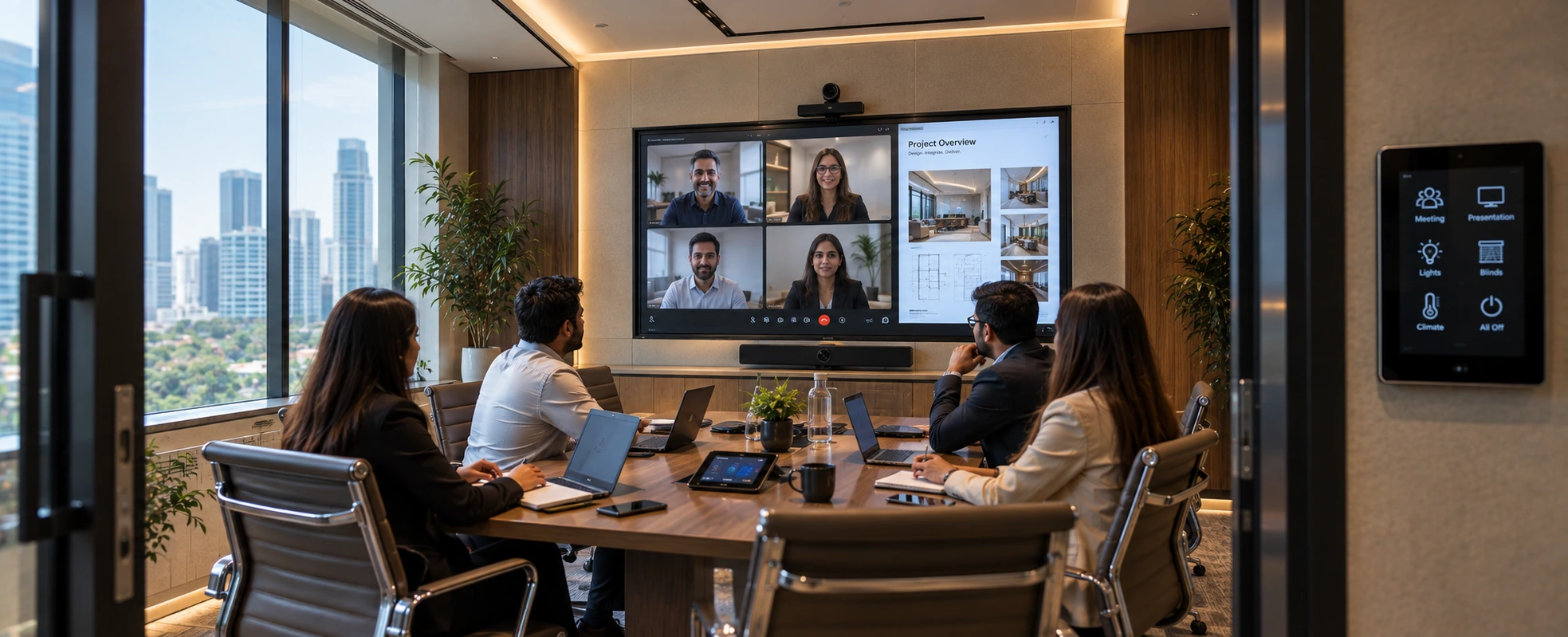
Conference room automation brings a meeting room's AV, displays, lighting, climate, and blinds under one control system - so a meeting starts with a single tap instead of five remotes and a support call. For offices, it means meetings that begin on time, rooms that are easy for anyone to use, and AV that works reliably. We design and integrate conference room systems as part of a wider office automation platform, so the room connects to the building rather than standing alone.
What is conference room automation?
Conference room automation is the integration of a meeting room's technology - displays, video conferencing, audio, lighting, blinds, and climate - into one control system operated from a single touch panel or app. Instead of juggling separate remotes and inputs, the room responds to simple actions like "Start Meeting" or "Presentation Mode".
The problem it solves is familiar to every office. A meeting is scheduled for 10:00. At 10:05, people are still finding the right HDMI input, hunting for a remote, dimming lights manually, and calling IT because the video call will not connect. Conference room automation removes that friction - the room is ready, every time, for anyone who walks in, without technical knowledge.
Why do offices need automated meeting rooms?
Offices need automated meeting rooms because unreliable, hard-to-use rooms waste time and money at scale. Every delayed meeting multiplied across a building, every day, is a real cost. Automation makes rooms start on time, usable by anyone, and consistent across the office - turning meeting spaces from a support burden into a reliable asset.
The business case rests on a few clear points:
Time recovered. The minutes lost at the start of every meeting to input-switching and troubleshooting add up fast across a busy office. A one-tap start reclaims them.
Usable by everyone. A room anyone can operate - not just the tech-confident - means fewer IT callouts and no meeting stalled because the one person who knew the system is away.
Consistency. When every room works the same way, staff and visitors know what to expect. This matters most in offices with many meeting rooms.
A better impression. For client meetings and interviews, a room that just works signals a company that has its act together. A fumbling AV setup signals the opposite.
An honest note: not every room needs full automation. A small huddle room may need only a display and a simple wireless-share device. Reserve full automation for the rooms where it earns its cost - boardrooms, client-facing rooms, and heavily used meeting spaces. A good integrator will tell you which rooms need what, rather than automating everything by default.
What does a smart conference room include?
A smart conference room typically includes a display or projection system, a video conferencing setup, room audio, a control interface, and automated lighting and blinds - all integrated. The exact mix depends on the room's size and purpose, from a simple huddle room to a full boardroom.
The core components:
| Component | Role in the room |
|---|---|
| Display/projection | The screen everyone looks at - a display for smaller rooms, projection for larger rooms |
| Video conferencing | Camera, microphones, and speakers for remote participants |
| Room audio | Clear sound for the room and for the far end of a call |
| Control interface | One touch panel or app to run it all |
| Lighting control | Scene-based light levels for presentation, video call, or discussion |
| Blinds/shading | Cut glare on screens, controlled with the room |
| Wireless presentation | Share from a laptop or phone without cables |
The point of integration is that these stop being separate systems. "Presentation Mode" lowers the blinds, sets the lights, powers the display, and selects the right input — one action, the whole room responds.
How does one-tap meeting control work?
One-tap meeting control works through a control system that ties every device in the room together, so a single command triggers a pre-programmed sequence. Pressing "Start Meeting" can power the display, lower the blinds, set the lighting, connect the video call, and select the input - all at once, in the right order.
This is the same scene principle used in home automation, applied to a meeting room. Behind the single button, the control system runs a defined sequence - and because it is programmed once and tested, it works the same way every time. The user never sees the complexity; they see a room that is ready.
The control system is what makes this possible, and it is where an experienced integrator matters. A room full of good AV hardware that is not properly integrated still needs five remotes. Integration - the programming that turns separate devices into one responsive room - is the actual product.
Which technology runs conference room automation?
Conference room automation is run by a control platform that unifies the AV, lighting, and room systems, often integrated with the wider building's KNX automation. Control platforms such as Crestron are built for exactly this, and displays and projection come from established brands chosen to match the room.
For the components, the choice is matched to the room and the office:
- Control platform — Crestron and similar professional control systems tie the room together and can link to the building
- Displays & projection — BenQ, Epson, Panasonic, LG, chosen by room size and lighting
- Building integration — KNX for lighting, blinds, and climate, so the room connects to the office rather than being an island
The reason to integrate the room with the building's automation, rather than treating it as standalone AV, is consistency and control. Lighting and blinds run on the same system as the rest of the office; energy is managed centrally; and facility teams see and manage meeting rooms alongside everything else. We cover the wider platform in our smart office automation guide and building-level integration in our commercial AV integration guide.
How much does conference room automation cost in India?
Conference room automation cost in India depends on room size, the components included, and the level of integration - so any figure is an indicative estimate, not a quote. A small huddle room with a display and wireless sharing is far lighter than a boardroom with projection, video conferencing, audio, lighting, and blind control. The reliable way to price it is a room-by-room survey against a defined scope.
What drives the cost:
- Room size and purpose — huddle room, meeting room, or full boardroom
- Display vs projection — and the size and quality needed for the room
- Video conferencing grade — basic to broadcast-quality
- Audio complexity — a small room versus a large room needing multiple microphones
- Integration depth — standalone AV, or full integration with lighting, blinds and building systems
- Number of rooms — offices standardising many rooms plan differently from a single boardroom
For a real figure, the rooms need to be surveyed and scoped. Any quote given without seeing the rooms is a guess. We survey first, then estimate against a defined scope - and we help decide which rooms need full automation and which need less.
FAQs
What is the difference between conference room AV and conference room automation?
Conference room AV is the hardware - displays, cameras, microphones, speakers. Conference room automation is the control layer that integrates that hardware so it works as one, operated with a single tap. AV alone can still mean five remotes; automation is what makes the room start with one action.
Can automation work with our existing video conferencing platform?
Generally yes. Conference room automation integrates the room's hardware and controls around your chosen video platform, so the room supports the way your organisation already meets. A survey confirms compatibility with your specific setup, which is why scoping comes before any recommendation.
Do small huddle rooms need full automation?
Usually not. A small huddle room often needs only a display and a wireless-share device. Full automation - integrated lighting, blinds, audio, and video under one control system - earns its cost in boardrooms, client-facing rooms, and heavily used spaces. A good integrator matches the level to the room rather than automating everything.
How reliable is one-tap meeting control?
Because the sequence behind the button is programmed once and tested, it runs the same way every time - which is more reliable than manual setup that depends on whoever is in the room. Reliability depends on proper integration and commissioning, which is where an experienced integrator matters most.
Can conference rooms connect to the rest of the office system?
Yes, and this is the stronger approach. Integrating meeting rooms with the building's KNX automation means lighting, blinds, and climate run on the same platform as the rest of the office, energy is managed centrally, and facility teams manage rooms alongside everything else - rather than the room being an isolated AV island.
How long does it take to automate our meeting rooms?
It depends on the number of rooms and the integration depth, and whether cabling infrastructure already exists. Offices standardising many rooms often phase the rollout. The survey and scope stage determines the timeline, which is why it comes first rather than committing to a date up front.
Planning conference room automation
A meeting room should be the easiest technology in the office to use, not the hardest. Conference room automation makes that real - meetings that start on time, rooms anyone can run, and AV that works because it was integrated properly rather than assembled from parts.
We design, integrate, and support conference room and office automation as one system, and we survey the rooms before we scope. Explore our office automation service, or talk to us about your meeting rooms. Book a meeting-room survey and scoping consultation → contact us