

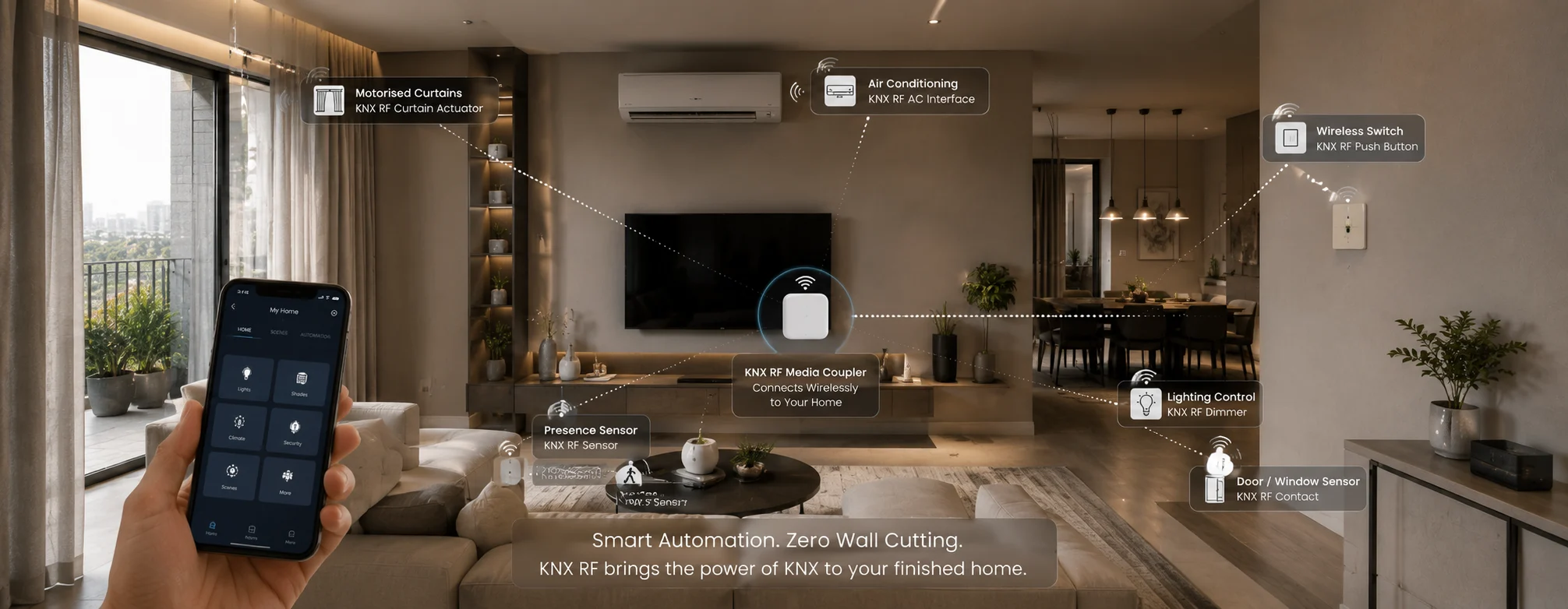
Most people who ask us about KNX are told the same thing somewhere along the way: it's a wired system, so unless you're building or gutting the place, it isn't for you.
We've said versions of that ourselves, and for new construction it's still the right advice. But it has left many people assuming that a finished home is simply out of the running - that once the marble is down and the false ceiling is closed, the choice is between breaking walls and settling for a collection of app-controlled gadgets.
There's a third option, and it doesn't get discussed enough in India. KNX RF is the wireless version of the same standard. Same openness, same ETS software your integrator already uses, same device logic - communicating over radio instead of a bus cable.
Why This Matters More Here
In most Indian cities, the majority of homes people want to automate are already built.
You take possession of a finished flat. The builder has done the wiring, the switches are in, the ceiling is closed. Nobody ran a bus cable, because nobody was thinking about automation at that stage. By the time you are, the window has closed.
And even where you'd be willing to open things up, you often can't. Apartment societies restrict structural work. Rented homes rule it out entirely. Older properties in parts of Lucknow, Jaipur, and Delhi have walls you don't want to start cutting channels into.
Wired KNX genuinely isn't the answer for any of those. KNX RF often is.
What is KNX RF?
The important thing is what it isn't.
It isn't a stripped-down cousin that borrowed the KNX name. It's the same standard using radio instead of cable. The device is still configured in ETS. It still uses group addresses. It still behaves like every other KNX device in the project. The only thing missing is the cable running to it.
That distinction matters because it determines what you own at the end. You still get the open standard, the ETS project file, and the ability to expand later using any certified manufacturer's devices - none of which you get from a set of WiFi gadgets bought separately.
Wired and Wireless as One System
Here's the part that makes it genuinely useful rather than just an alternative.
A media coupler joins the wireless side to the wired bus, so both run as a single installation. A battery-powered wireless switch and a wired dimming actuator sit in the same ETS project, respond to the same scene, and are addressed the same way.
For a homeowner, that means you don't have to pick one approach for the whole house. Where cable can reach, it goes in. Where it can't - a converted terrace, a floor added five years later, an outhouse across the plot - RF covers it. You see one system, because it is one system.
We've found this matters most for properties that grew over time, which describes many Indian homes. A ground floor built in one decade, a first floor added in the next, a terrace room after that. Wired throughout was never realistic. One system across all of it still is.
Where We'd Actually Recommend It
A finished home with no automation at all. The most common case by far. Plastering done, ceiling closed, and running bus cable means opening finished surfaces and reinstating them afterwards.
Extending a system that's already working. A new room or floor added to a house that already runs KNX. RF brings it into the existing installation without disturbing what's there.
Places cable can't reasonably go. The gate at the end of a long driveway, a servant's quarter, a detached garage, an outhouse. Trenching across a finished garden to reach them rarely makes sense.
Buildings you shouldn't be cutting into. Heritage properties, or any structure where channelling the walls is a bad idea for reasons beyond cost.
Rented and leased premises. Where you can't make structural changes but still want proper scene control rather than five different apps.
Keeping switches you like. Interface devices can bring existing push-buttons and sensors into KNX wirelessly, so plates and hardware you've already chosen stay exactly where they are.
What Can Run Wirelessly?
Most of what a retrofit actually needs:
- Wall switches and keypads — battery-powered, going in where a conventional switch was
- Window and door contacts — reporting open, closed, or tilted state back to the system
- Presence and motion sensors — for occupancy-based lighting
- Interfaces for existing hardware — bringing conventional switches into KNX without replacing them
- Actuators for lighting and shading — where a supply already exists at the device
What still needs cable is anything that needs power it doesn't already have. A curtain motor needs a supply at the pelmet whether you control it wirelessly or not - the control can be wireless; the power can't be.
Is Wireless KNX Secure?
Fair question, and the honest answer is: it depends on what gets specified.
The KNX standard includes KNX Data Secure, which uses AES-128 encryption to protect communication between devices. KNX RF devices can support it - but "can" is carrying weight in that sentence. Whether your installation is actually running secured communication comes down to which devices are chosen and how the project is configured.
Ask your integrator this directly rather than assuming. On our projects, we'd expect to specify secured devices on any wireless segment, and we'd tell you plainly if that wasn't possible for a particular device.
The Trade-Offs, Honestly
KNX RF isn't wired KNX minus the inconvenience. There are real differences.
Wired KNX | KNX RF | |
|---|---|---|
| Installation | Cable to every device | No cable required |
| Best for | New build, major renovation | Finished homes, extensions, retrofits |
| Power | Bus-powered | Many devices battery-powered |
| Maintenance | Essentially none | Battery replacement on some devices |
| Range | Not a factor | Depends on distance and structure |
| Configuration | ETS | ETS — same software, same project |
Two things worth thinking about before you commit.
Batteries mean upkeep. Manufacturers quote long service life for low-traffic devices, and the figures are generally good - but thirty battery-powered devices means thirty things that eventually need attention. It's worth agreeing upfront whether that sits with you or with your integrator's maintenance contract.
Concrete affects range. Indian homes are built with a lot of reinforced concrete, and RC slabs and thick masonry cut radio range considerably more than the lighter construction most product literature assumes. What a datasheet says and what happens across three floors of an RC-framed house can be different things, so range needs checking on site rather than assuming.
What Does It Cost Compared to Wiring?
The devices themselves are broadly comparable to their wired equivalents. The difference is in what you avoid.
Retrofitting bus cable into a finished home typically adds thirty to fifty per cent to the automation cost, and that's before the civil work - cutting channels, reinstating plaster, repainting, and living with the mess while it happens. On a marble-floored, false-ceilinged home, the making-good is often the larger number.
RF avoids that category of cost entirely. So while it isn't cheaper device for device, it's usually meaningfully cheaper as a project in a finished home.
In a house still under construction, the position reverses. Cable is going in anyway, conduit costs very little at that stage, and wired remains the lower total cost with no batteries to think about. Our guide on wired vs wireless covers that comparison properly.
So Which Should You Choose?
If you're building, wire. That advice hasn't changed, and we'd give it to anyone.
If your home is finished, the real comparison isn't RF against wired KNX - it's RF against giving up on proper integration and buying a set of unconnected smart devices instead. Put that way, it's usually not a close call. You keep the open standard, you keep the project file, and you keep the option to add to it in five years.
The argument for KNX RF isn't that wireless is better. It's that a finished home shouldn't have to choose between doing it properly and not doing it at all.
FAQs
Is KNX RF the same standard as wired KNX?
Yes. Same openness, same manufacturer independence, same ETS configuration and project file. The difference is that devices talk over radio instead of a bus cable. A media coupler lets wireless and wired devices run as one installation.
Can I add wireless devices to my existing KNX system?
Yes, through a media coupler. They appear in the same ETS project and can be included in the same scenes as your wired devices. Extending a working system without disturbing it is one of the more common reasons to use RF.
Do the devices need batteries, and who changes them?
Many wireless devices are battery-powered, particularly switches and window contacts. Service life is generally long, but on a system with many wireless points it's worth agreeing upfront whether replacement sits with you or under a maintenance contract.
Will it work reliably across three floors of a concrete house?
Range depends on distance and what the signal has to pass through, and reinforced concrete reduces it noticeably. This is something to verify on site during the survey rather than take from a datasheet — it's one of the first things we'd check.
Is wireless KNX less secure than wired?
The standard includes Data Secure with AES-128 encryption and RF devices can support it, but whether a given installation uses it depends on the devices specified. Worth confirming with your integrator rather than assuming either way.
Can I do this in a rented flat?
Often yes, which is one of the more useful things about it. Battery-powered switches and sensors go in without structural changes, and most can be removed and taken with you. Worth checking your agreement, but there's usually nothing to make good afterwards.
Is it cheaper than running cable?
Device for device, no. As a project in a finished home, usually yes — because you avoid channelling walls, reinstating plaster and repainting. In a new build where cable is going in anyway, wired works out cheaper.
Already Built? Still Worth a Conversation
If someone told you KNX wasn't an option because your home is finished, that may not be the whole picture. Whether RF makes sense depends on the building, what you want to control, and how much can still be reached with cable — which is a site visit, not a phone call.
If you're in Noida, Delhi NCR, Gurgaon, or Jaipur, talk to our team, and we'll give you a straight answer on what's practical for your property. You can also read our upgrade guide or explore our home automation services.