

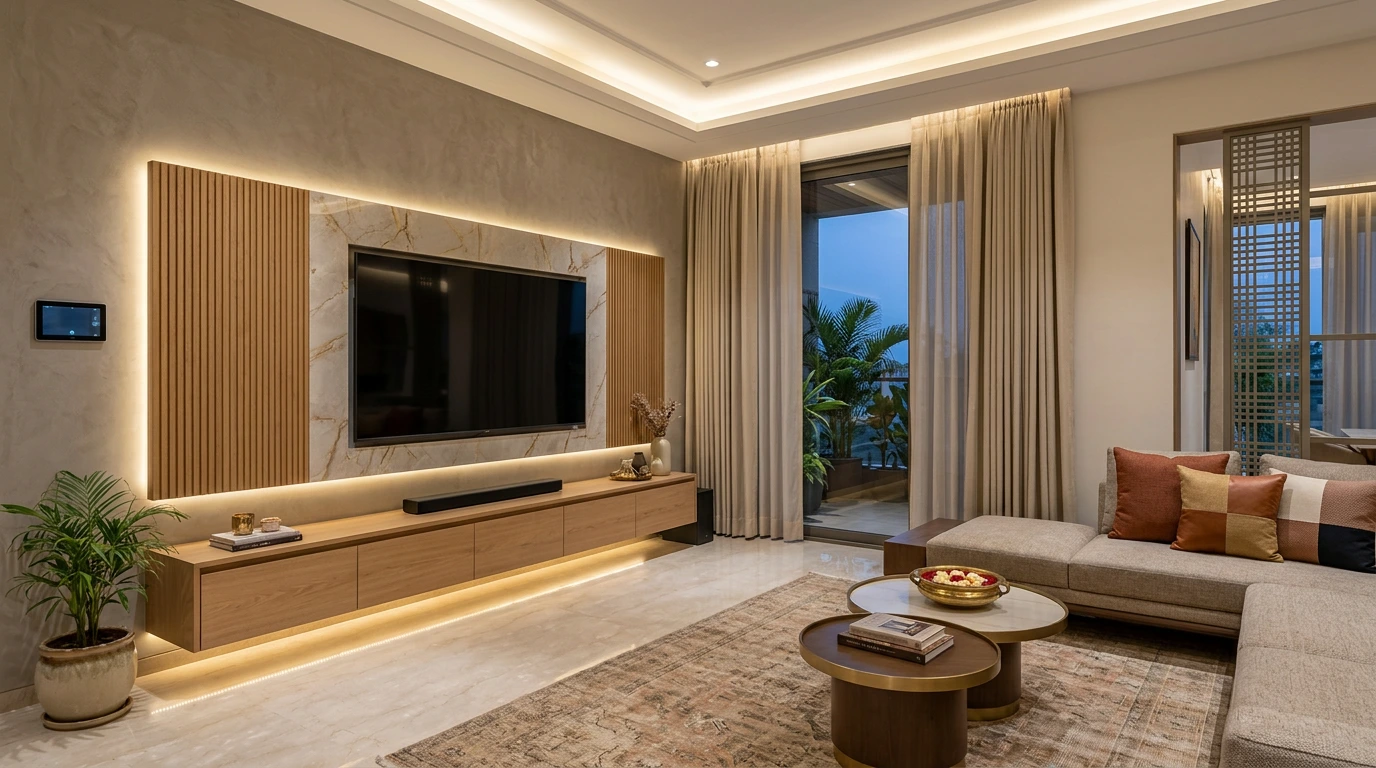
A smart TV cabinet is designed around the technology, not just around storage — concealed wiring, a hidden and ventilated equipment niche, integrated backlighting, hidden speakers where wanted, and everything run from one remote or app. The result is a clean, minimal media wall with no visible cables or clutter. The secret is to design the cabinet and the home automation together, before the carpentry is built — that's what makes the technology disappear into the design.
The TV unit is the centrepiece of most living rooms, and in a modern home it's where interior design and technology meet. Done well, it looks like a beautiful piece of furniture — and quietly hides a full AV and automation setup. Done without planning, it becomes a shelf of boxes and a tangle of wires. This guide covers smart TV cabinet design ideas and the automation to build into them.
What Makes a TV Cabinet "Smart"?
An ordinary TV stand just holds the television and the boxes. A smart TV cabinet is designed so the technology is built in and out of sight: cabling is concealed, the equipment sits in a hidden, ventilated compartment, speakers are integrated, lighting is part of the design, and control comes down to one app or remote instead of four. The look is clean and minimal precisely because everything is planned — which is why the best smart TV units are designed alongside the home's automation.
Smart TV Cabinet Design Ideas
A few directions that work beautifully in modern Indian homes:
- Floating wall-mounted console — a slim, wall-hung unit with concealed wiring and no legs, giving a light, modern look. All cabling runs into the wall or the cabinet, so nothing shows.
- Full-wall panelled media unit — a floor-to-ceiling panelled wall (wood, fluted, stone or laminate) with the TV set in, hidden speakers behind acoustic panels, and storage integrated seamlessly.
- Backlit TV unit — profile or cove lighting behind the TV and along the unit's edges, creating depth and a premium glow; automated so it dims and sets scenes. Our guide to cove light vs profile light helps you choose the right one.
- Minimalist "everything hidden" unit — clean lines, no visible devices; the equipment lives in a concealed ventilated cabinet, and the room reads as pure architecture.
- Media wall with a concealed equipment rack — a dedicated, ventilated niche (often beside or below) that houses the set-top box, amplifier, and router neatly, accessible but out of sight.
- Open shelving with integrated accent lighting — display shelving with discreet LED lighting, balancing warmth and a modern edge.
Across all of these, the design choices and the AV wiring need to be decided together — the cabinet is as much an infrastructure decision as a furniture one.
Home Automation Features to Build Into Your TV Unit
This is what turns a good-looking unit into a smart one:
- Concealed wiring & cable management — planned routes and conduits so there are zero visible wires between the TV, the equipment and the power points.
- A hidden, ventilated equipment niche — set-top box, amplifier, console and router kept cool and out of sight; our home networking guide covers the connectivity behind it.
- Integrated speakers — in-wall, in-cabinet, or invisible plaster-in speakers, or hidden speakers around the unit for clean, full sound, planned with the home audio layout.
- Automated backlighting — profile/cove lighting that dims and sets scenes with the rest of the home.
- One-tap / one-app control — a single app or remote that turns on the TV, dims the lights, closes the blinds, and sets the sound — a "Movie" scene in one touch.
- Power & network points — enough concealed power and data outlets behind the TV and in the niche, planned.
- Motorised options — for luxury rooms, a lift that hides the TV, or motorised panels that conceal the screen when it's off.
Designing It Right: A Few Tips
- Plan it before the carpentry. Cable routes, speaker positions, ventilation and lighting are far cleaner designed in than added later.
- Ventilate the equipment. Hidden devices still need airflow — a sealed box shortens their life.
- Get the TV height right. Comfortable viewing height matters as much as looks.
- Match the lighting temperature. Warm backlighting (around 2700–3000K) suits a living room; tie it into your lighting design.
- Design the unit and the automation together — this is the single thing that separates a clean smart media wall from a cluttered one.
How TechVault Designs AV-Ready TV Units
We work with you and your interior designer to design the TV unit and its technology as one — planning concealed wiring, a ventilated equipment niche, integrated speakers, automated backlighting, and single-app control into the carpentry from the start, on reliable open standards like KNX. The result is a media wall that looks like beautiful furniture and behaves like a cinema. Explore our audio-video and automation services for more.
If you're designing a living room or a media wall, the best time to plan the technology is now — before the unit is built. Book a consultation with TechVault.
FAQs
What is a smart TV cabinet or unit?
A smart TV cabinet is a media unit designed around home automation, not just storage — with concealed wiring, proper cable management, a hidden and ventilated equipment space, integrated lighting, hidden speakers where wanted, and everything controllable from one remote or app. It looks clean and minimal because the technology is built in and out of sight, rather than a tangle of boxes and cables on an ordinary TV stand.
How do you hide wires in a TV unit?
The clean way is to plan it before the unit is built: run concealed conduits inside the wall or the cabinet, provide power and network points behind the TV and in the equipment niche, and route all cabling into a single ventilated compartment. For a wall-mounted TV, in-wall cable routes hide everything between the screen and the cabinet. Done at the design stage, there are no visible wires at all — retrofitting is possible but messier.
Can you build speakers into a TV cabinet?
Yes. In-wall and in-cabinet speakers, a concealed soundbar, or invisible plaster-in speakers around the unit can give full sound while keeping the look clean. Planning the speaker positions and wiring with the cabinet design is what makes it seamless. For how discreet speakers work, see our guides to hidden and invisible speakers.
How do you add lighting to a TV unit?
Backlighting is the signature touch — profile or cove lighting behind the TV, under shelves, and along the unit's edges adds depth and reduces eye strain in a dark room. When it is automated, the lighting can dim and set scenes (a warm glow for movies, brighter for everyday) with the rest of the home. The key is choosing the right profile and colour temperature and tying it into your lighting control.
Should home automation be planned before making the TV unit?
Ideally, yes. The cleanest smart TV units are designed with the automation — cable routes, power and network points, speaker positions, equipment ventilation and lighting — planned before the carpentry is built. Adding it afterwards is possible but usually means visible compromises. If you are doing an interior fit-out, that is the perfect moment to design the AV and automation into the unit.
What is the best TV unit design for a modern living room?
There is no single best design — it depends on your room and style. Popular modern approaches include a floating wall-mounted console with concealed wiring, a full-wall panelled media unit with hidden speakers, and a minimalist backlit unit where all the technology is built in. What they share is clean lines, no visible clutter, integrated lighting, and one-tap control — which comes from designing the unit and the automation together.