

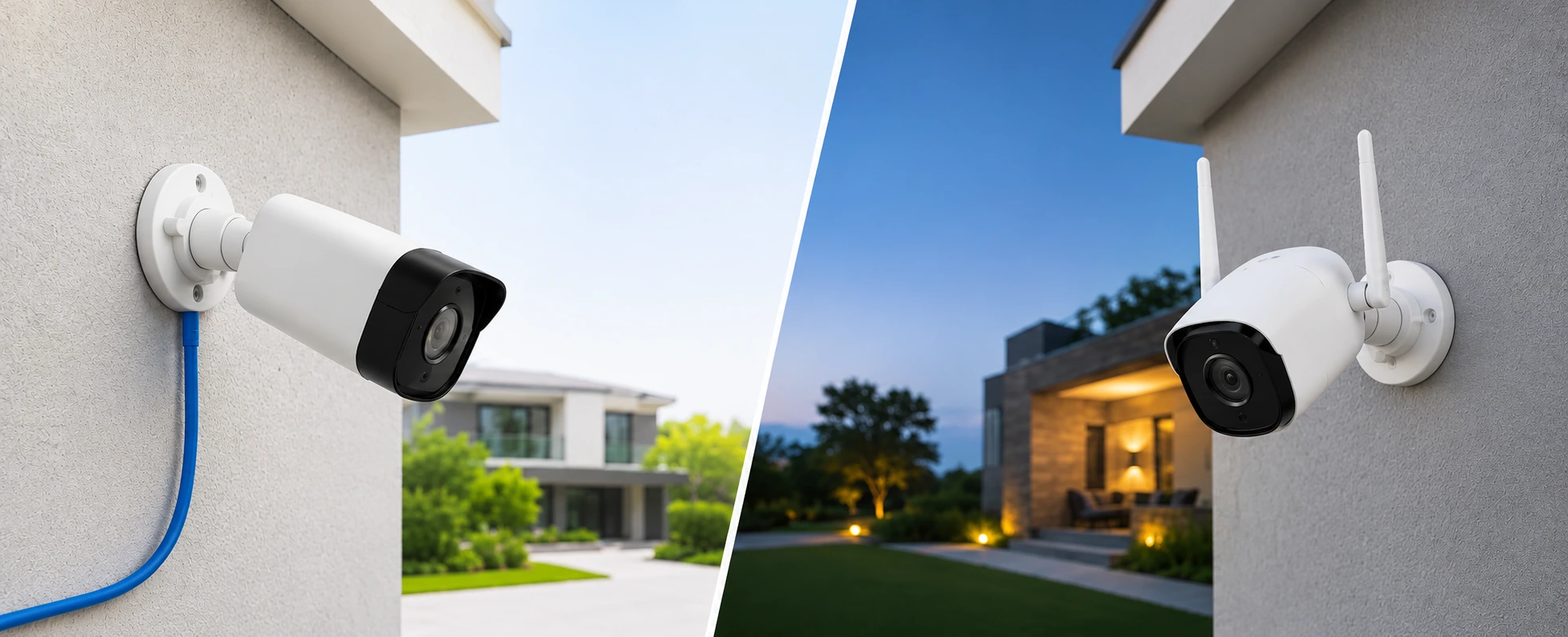
Wired security cameras — usually PoE (one network cable carries power and video) recording to a local NVR — are the more reliable choice for a whole-home system: always powered, not dependent on Wi-Fi, and self-contained with local storage. Wireless cameras send video over Wi-Fi and run on battery or a plug, which makes them easy to install but reliant on your Wi-Fi and often a cloud subscription. For a serious setup — especially a villa or new build — wired usually wins; wireless suits rented homes, retrofits and covering a specific spot quickly. Many homes do best with a wired core plus a few wireless cameras.
Choosing home security cameras comes down to one early decision: wired or wireless. It affects how reliable your coverage is, how footage is stored, what it costs over time, and how easy it is to install. This guide compares the two plainly so you can pick what suits your home.
What Are Wired Security Cameras?
A wired security camera connects by cable — most commonly a single Ethernet cable using PoE (Power over Ethernet), which carries both power and video down one wire — to a local recorder, the NVR (network video recorder), kept in the home.
Because power and connection are constant and dedicated, wired cameras are stable and don't drop out when Wi-Fi is busy or the internet is down. Footage records locally, so there's usually no subscription and the video stays on your premises. The trade-off is installation: cabling has to be run, which is cleanest to plan during construction or renovation. This is the approach we favour for comprehensive coverage, as in our guide to CCTV and security solutions for luxury homes.
What Are Wireless Security Cameras?
A wireless security camera sends its video over Wi-Fi, and is powered either by a rechargeable battery or a nearby plug. Many store footage in the cloud and are viewed through an app.
Their big advantage is easy installation — no cabling, so they can go up quickly and move if needed, which is ideal for rented homes, retrofits, or covering one specific area. The trade-offs: they depend on a strong, stable Wi-Fi signal; battery models need periodic charging; and cloud storage often means an ongoing subscription and reliance on the internet. A reliable home network matters a great deal for wireless cameras to perform well.
Wired vs Wireless Security Cameras: Key Differences
| Feature | Wired (PoE / NVR) | Wireless (Wi-Fi/battery) |
|---|---|---|
| Reliability | Very stable, constant power | Depends on Wi-Fi & battery |
| Power | Constant (PoE or mains) | Battery or plug |
| Installation | Cabling needed; best at construction | Easy, minimal, movable |
| Storage | Local NVR (no subscription) | Often cloud (subscription) |
| Works without internet | Yes (records locally) | Often limited |
| Interference | None | Possible Wi-Fi congestion |
| Best for | Whole-home, villas, new builds | Renters, retrofits, specific spots |
| Ongoing cost | Low | Possible cloud fee + batteries |
The simplest way to frame it: wired is for dependable, permanent, whole-home coverage; wireless is for flexibility and quick, specific coverage.
Where Wired Cameras Win
Wired systems are the standard wherever security really matters. For a villa, a large home or a new build, wired coverage gives dependable, always-on recording that doesn't falter with Wi-Fi or internet, keeps footage on-site, and avoids subscriptions and battery maintenance across many cameras. If you're planning a complete system, our villa security systems guide goes deeper.
Where Wireless Cameras Make Sense
Wireless cameras earn their place where cabling isn't practical or permanence isn't needed: a rented home you can't rewire, a quick retrofit, a temporary need, or one tricky spot far from the recorder. They're also an easy way to start small. In many homes the best answer is a hybrid — a wired core for the main coverage, with a few wireless cameras for hard-to-reach places.
A Note on Storage: Local vs Cloud
This often matters as much as wired vs. wireless. Local storage (NVR) keeps footage in your home, with no subscription and no dependence on the internet — more private and self-contained. Cloud storage is convenient and off-site, but usually means an ongoing fee and relies on connectivity. Decide how much footage you want, for how long, and how you feel about where it lives — then let that guide the camera choice too.
Which Is Better for Your Home?
- Villa / large home / new build → wired (PoE + NVR) for dependable whole-home coverage.
- Apartment you own → wired if you can cable during a fit-out; otherwise a good wireless or hybrid setup.
- Rented home → wireless, for easy, damage-free installation you can take with you.
- One specific area, added later → a wireless camera is the quick fix.
Whatever you choose, cameras are only one layer of home security. They work best alongside alarms and access — see our guides to home burglar alarm systems, the Ajax alarm system and a video door phone.
How Cameras Fit Into an Integrated Smart Home
Here is where a camera becomes more than a camera. In an integrated smart home, cameras join one system alongside alarms, access control and lighting — viewed in the same app, sending smart alerts, and able to trigger actions (lights coming on when motion is detected at night). That integrated approach, on a reliable backbone, is far more useful than a standalone camera app, and it's how we design security as part of the whole home. Explore our security & surveillance and automation services, and our overview of how smart security detects suspicious activity.
If you want security cameras chosen and integrated properly for your home, book a consultation with TechVault.
Frequently Asked Questions
What is the difference between wired and wireless security cameras?
A wired security camera carries both power and video over cables — typically a single network cable using PoE (Power over Ethernet) — and records to a local recorder (NVR). A wireless camera sends its video over Wi-Fi and is powered either by a battery or a nearby plug, often storing footage in the cloud. Wired is more stable and self-contained; wireless is easier to install but depends on your Wi-Fi and, often, a subscription.
Which is better for a home, wired or wireless cameras?
For a serious, whole-home system — especially a villa or a new build — wired cameras are usually better: they are more reliable, always powered, not dependent on Wi-Fi, and store footage locally. Wireless cameras are better where easy installation matters most — rented homes, retrofits, or covering a specific spot quickly. Many homes use a wired core with a few wireless cameras for hard-to-reach places.
Are wired security cameras more reliable than wireless?
Generally, yes. Wired cameras have a constant power supply and a dedicated cable connection, so they do not drop out when Wi-Fi is congested or the internet is down, and they are not affected by battery life. Wireless cameras are convenient but depend on a strong, stable Wi-Fi signal and, for battery models, regular charging — which is why a wired system is the standard where dependable coverage matters.
Do wireless cameras need the internet to work?
Most wireless cameras need Wi-Fi to connect, and many rely on the internet and a cloud account for storage and remote viewing — so they can be affected by an outage. Wired systems with a local recorder keep recording even without internet, and let you view footage on the local network. If uninterrupted recording matters, a wired setup with local storage is the safer choice.
Where is footage stored — local or cloud?
Wired systems typically record to a local NVR (network video recorder) kept in the home, which means no subscription and footage that stays on your premises. Wireless cameras often use cloud storage, which is convenient and off-site but usually involves an ongoing subscription and depends on the internet. Some systems offer both. The right choice depends on how much footage you want to keep, for how long, and your privacy preference.
Can security cameras be integrated into a smart home?
Yes. In an integrated smart home, cameras become part of one system alongside alarms, access control, and lighting — so you can view them in the same app, get alerts, and trigger scenes (for example, lights coming on when motion is detected). This integrated approach, on a reliable backbone, is far more useful than a standalone camera app, and it is how professionally designed homes handle security.